
Pit Boss Grills
DansonsFood & Drink
3.44.08K Reviews
- Version
- 2.10.17
- Installs
- 500.00K
- Age Rating
- Everyone
Screenshots
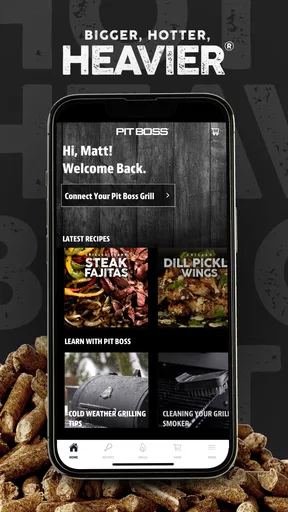

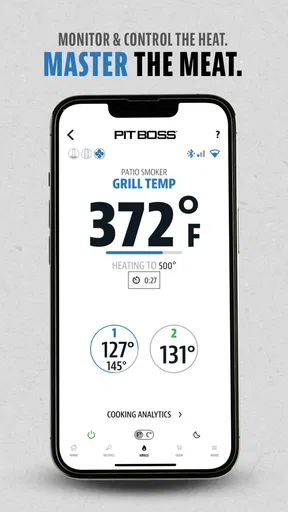
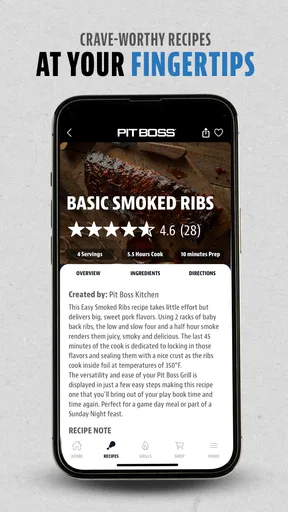
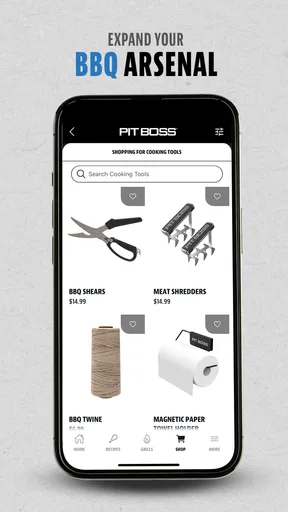
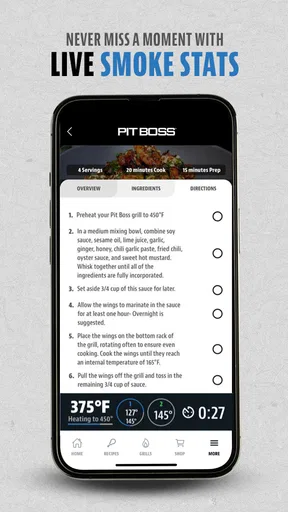
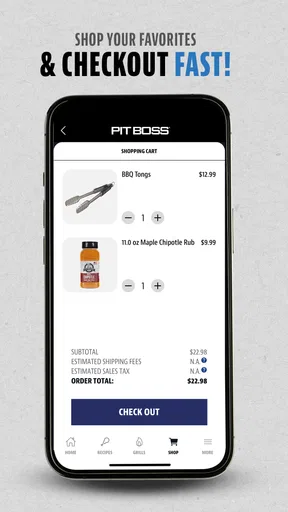
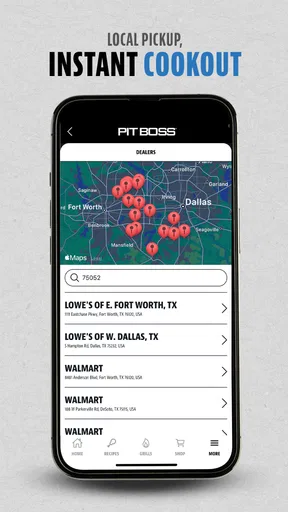
Our Review of Pit Boss Grills
 Analysis by Appyee
I found Pit Boss Grills most useful when I treated it as a companion for the grill rather than as a complete cooking solution. Developed by Dansons, this free Food & Drink app is aimed at people who already use Pit Boss equipment and want a more organized way to approach outdoor cooking. My overall view is positive but measured: it can make planning and learning easier, yet its value depends heavily on how much you want from an app while standing beside a grill.
The central strength is its focus. Instead of trying to be a general recipe collection for every kitchen appliance, it is built around Pit Boss Grills. That makes the experience more relevant for owners who want guidance connected to their equipment. I would recommend giving it a serious look if you are new to smoking, still building confidence with longer cooks, or regularly forget the small preparation steps that make outdoor cooking less stressful.
At the same time, I would not install it expecting the depth of a dedicated recipe platform, a universal grill controller, or a replacement for learning how your particular smoker behaves. The app has a practical role, but it is not automatically the best choice for someone who uses several brands or prefers to manage every detail independently.
What using Pit Boss Grills feels like in everyday cooking
The app’s identity is clear from the moment you consider its purpose: it is made for Pit Boss Grills, not for indoor cooking in general. That narrow focus is helpful because outdoor cooking has its own rhythm. You are thinking about fuel, heat, timing, preparation, and serving order, often while your hands are busy and the weather is changing. A grill-focused app can reduce the amount of information you need to gather from different places.
I found the most sensible way to use it was before the cook, not only during it. Looking through the app ahead of time gives me a chance to decide what I am making, check the general approach, and prepare ingredients before the grill is hot. That matters more with smoking or slow cooking than with a quick meal. Once food is already on the grates, searching for basic direction becomes inconvenient, especially if the phone is near smoke, grease, or wet outdoor surfaces.
For a realistic weeknight example, imagine planning dinner after work and wanting to use the grill without improvising everything. I would open the app earlier in the day, choose a suitable idea, make a short shopping list from the ingredients, and prepare anything that benefits from resting or seasoning. Later, the phone becomes a reference rather than the center of attention. That workflow is more useful than constantly checking an app between every cooking step.
The app is also approachable for someone who has bought a Pit Boss grill but has not yet developed a reliable routine. New owners often know the basic controls but are less certain about how to organize a cook. A focused companion can help turn the equipment from an intimidating purchase into something used regularly. I especially like that the app’s purpose is easy to understand; there is no need to learn a complicated productivity system before getting to the food.
Its audience is reflected in its broad availability. It is free, suitable for Everyone, and supports devices running Android 7.0 or later. That makes it accessible to many owners using older phones, although the experience will still depend on the condition and performance of the individual device. The current release is version 2.10.17, so it is not an abandoned-looking project frozen at its earliest stage.
Why the focused approach is its best feature
In my experience, the strongest reason to choose this app is not simply that it contains cooking material. Plenty of food apps do that. The advantage is the connection between the content and the Pit Boss context. When an app is designed around a specific grill family, its advice feels more relevant than a random recipe saved from a general cooking website.
That focus also makes it easier to develop repeatable habits. I can use the same preparation pattern for future cooks: select an idea, inspect the ingredients, prepare in advance, and keep the app available as a reference. Repetition is important with barbecue because consistency often comes from process rather than from one exciting recipe. The app is most valuable when it helps me build that process.
Another useful insight is that I would not judge it only by whether I discover a new dish every time I open it. Its better role may be helping me revisit familiar ingredients with more confidence. If I already have chicken, vegetables, or a cut of meat in the refrigerator, a grill-centered collection can prompt a more deliberate plan than simply turning on the barbecue and hoping for the best.
This is also where the app can be more practical than a printed cookbook. A paper book is pleasant in a clean kitchen, but it is less convenient beside an outdoor grill. The phone can stay with me while I move between preparation and cooking. On the other hand, a cookbook remains better for people who dislike handling a phone around food or who want a broader culinary reference. The choice depends on whether convenience at the grill matters more than a richer, more permanent reading experience.
Where it helps beginners—and where it does not
I think beginners will get the clearest benefit. Someone who is still learning how to plan a cook can use the app as a starting point instead of searching across unrelated videos, blogs, and social posts. That reduces decision fatigue. It also encourages a more complete view of the meal, where preparation and timing matter as much as the final seasoning.
However, I would not rely on any app alone for food safety or for learning the exact behavior of a particular grill. Outdoor cooking conditions vary, and the same setting may behave differently depending on weather, food thickness, placement, and how often the lid is opened. I still use my own judgment and appropriate food-safety practices. The app can guide a plan, but it cannot see the food on my grill or correct every mistake in real time.
That distinction is important for new owners. A recipe can tell me what I intend to do, but it cannot remove the need to watch the cook. If I am preparing an expensive cut for guests, I want a thermometer and a backup plan rather than blind trust in a phone screen. The app works best as one part of a cooking setup, not as the only source of authority.
Experienced grill users may find the app less essential. If I already have a notebook full of timings, a preferred seasoning routine, and a strong understanding of my equipment, I may open it mainly for inspiration. That is not a flaw for beginners, but it does limit the reason for advanced users to return frequently. A specialist who wants deep experimentation, detailed logging, or highly technical barbecue discussion may prefer a dedicated community or a more flexible cooking tool.
The friction I noticed during longer cooks
The main weakness is that a grill companion can become less convenient precisely when cooking becomes demanding. A long outdoor cook requires attention to the food, the grill, and the surroundings. Reading a phone while wearing gloves or handling raw ingredients is awkward. If I have to repeatedly unlock the device, scroll, or keep the screen visible, the app starts competing with the cooking instead of supporting it.
My practical solution is to use it in stages. I read through the chosen recipe before lighting the grill, prepare the ingredients in advance, and make a mental note of the critical steps. During cooking, I check only what I genuinely need. This turns the app into a preparation tool and avoids the expectation that it should function like a hands-free assistant.
Another trade-off comes from specialization. If my household uses a Pit Boss grill for weekend barbecue but a different brand for other outdoor cooking, this app will not necessarily become my one-stop kitchen reference. A general recipe app may be more efficient for a mixed equipment setup because it keeps all meals in one place. The Pit Boss option makes more sense when the grill is central to the way I cook.
The average rating is 3.4 from around 5.3 thousand ratings, with roughly 4.1 thousand written reviews. I read that as a signal to keep expectations realistic rather than as a reason to dismiss the app. A middling average often means the usefulness is uneven across devices, routines, and expectations. Someone looking for focused grill guidance may be satisfied, while someone expecting a polished all-purpose cooking hub may be disappointed.
The app’s scale is still notable: it has passed 500 thousand installs. That suggests it has reached a substantial community of grill owners, but popularity does not guarantee that every person will find the interface or content equally useful. I would use its broad adoption as reassurance that it is worth trying, not as proof that it will replace every other cooking resource.
Smart ways to get more value from it
My first tip is to choose the meal before shopping rather than opening the app in the supermarket and making a rushed decision. Outdoor recipes often involve ingredients that need preparation, and planning earlier gives me time to season, thaw, or organize the cooking order. This small change makes the app feel much more useful because it supports the whole meal instead of only the final cooking stage.
My second tip is to create a personal routine around the app without assuming that every instruction will match my exact conditions. I use the selected recipe as a framework, then pay attention to the food itself. If the weather is cold or windy, I allow extra flexibility in my schedule. If guests are arriving, I plan serving time backward and avoid choosing a cook that leaves no room for delay.
A third, less obvious use is to treat the app as a learning prompt. After a cook, I think about what I would change next time: seasoning, placement, preparation timing, or the point at which I checked the food. Even if the app does not replace a dedicated cooking journal, it can help me begin a repeatable cycle of planning, cooking, and adjusting. That is more valuable than simply browsing attractive meal ideas.
I also recommend keeping a backup for important meals. I may save the essential ingredients and key steps somewhere easy to reach before going outside. That is not because the app is unusable, but because phones can be distracting, dirty, low on battery, or difficult to read in bright sunlight. A short handwritten note or a prepared mental checklist can make a long cook calmer.
For households, the app can support shared planning if one person handles preparation and another manages the grill. I can review the meal beforehand, explain the sequence, and divide the work. This is a better use than handing the phone to someone at the last minute and expecting them to interpret everything while the grill is already running.
Who should install it, and who should look elsewhere
I would recommend Pit Boss Grills to owners who want a free, brand-focused starting point for outdoor meals. It is particularly suitable for new grill owners, casual barbecue cooks, and anyone who wants inspiration tied to the equipment already sitting on the patio. The Everyone age rating also makes it a reasonable household reference, though children should not be treated as responsible for operating hot cooking equipment.
It is less compelling for someone who does not own Pit Boss equipment. The app’s identity is too specific for me to choose it as a general food app when my cooking happens mostly indoors or across several unrelated grill brands. In that situation, a broad recipe service would probably offer better coverage and fewer reasons to switch between tools.
I would also suggest skipping it if the main thing you want is advanced data tracking. A serious barbecue hobbyist may prefer an app built around detailed temperature logs, custom notes, timers, and long-term comparisons. Likewise, people who primarily want restaurant discovery, grocery delivery, nutrition analysis, or meal budgeting should choose an app designed for those tasks. This one is best judged as a grill companion, not as a complete food-management system.
For someone deciding whether to try it, the low-risk answer is straightforward: because it is free, installation is easier to justify if you already own a Pit Boss grill. Give it a few planned cooking sessions rather than judging it after a quick browse. Use it before shopping, prepare from it before lighting the grill, and see whether it improves your routine. If it only produces extra screen time without helping you cook more confidently, it is probably not earning space on your phone.
My final verdict
Pit Boss Grills is most successful as a practical planning companion for Pit Boss owners, not as a universal cooking app. I like its clear purpose, its accessibility, and the way it can help beginners move from owning a grill to actually using it. The focused approach gives it more relevance than a generic collection of recipes when I am preparing food on compatible equipment.
Its limitations are equally clear. I would not expect it to replace hands-on judgment, a thermometer, a personal cooking record, or a broader recipe service. The phone can become inconvenient beside a hot grill, and experienced users may outgrow the guidance if they already have a dependable barbecue system.
Still, I think it is worth trying for the right person. If a Pit Boss grill is part of your regular routine and you want a free way to organize ideas before cooking, this app has a sensible place in that process. If you need advanced tracking, brand-neutral recipes, or a full meal-management tool, another option will likely suit you better. My recommendation is therefore specific but genuine: install it when you want help becoming more consistent at the grill, and use it as a guide that supports your decisions rather than making them for you.
Verdict
Strengths of Pit Boss Grills
- Official recipes and cooking guidance are useful for beginners.
- Grill temperature monitoring can make long cooks easier.
- Product information helps compare Pit Boss grill models.
- The app supports planning meals before starting a cook.
- A convenient companion for owners using connected grill features.
Limitations of Pit Boss Grills
- Some features require a compatible Pit Boss grill model.
- Bluetooth or Wi-Fi connection may be inconsistent for some users.
- The recipe selection may feel limited compared with larger cooking apps.
- Account creation can be required for certain app functions.
- Notifications and background connectivity may affect battery life.
Similar Picks in This Category
View All
Rappi: Food Delivery, Grocery
Rappi, Inc - Delivery3.5

McDonald’s: Cupons e Delivery
Arcos Dorados4.3

Swiggy: Food Instamart Dineout
Swiggy4.7

Blinkit: Groceries & more
Blinkit4.8

foodpanda: food & groceries
Foodpanda GmbH a subsidiary of Delivery Hero SE4.0

Zomato: Food Delivery & Dining
Zomato4.7
Frequently Asked Questions
What is the Pit Boss Grills app used for?
The Pit Boss Grills app is designed to help owners get more from compatible Pit Boss smokers and grills. Depending on the model, it can provide remote temperature monitoring and control, cooking guidance, recipes, timers, alerts, and access to product information. Its exact features may vary, so users should check whether their grill supports app connectivity before downloading.
Is the Pit Boss Grills app compatible with every Pit Boss grill?
No, compatibility is not universal across the entire Pit Boss range. The app generally works with models that include supported Wi-Fi or Bluetooth technology, while older or more basic grills may not offer remote connectivity. Before installing it, check your grill’s model number, user manual, and the compatibility information listed on the official app store page.
Can I control my grill remotely with the Pit Boss Grills app?
On compatible models, the app can allow you to monitor cooking temperatures and adjust certain settings from your smartphone. This is useful when preparing food over a long period because you can receive updates without standing beside the grill. However, remote functions depend on the grill model, network connection, app permissions, and a stable internet connection.
Does the Pit Boss Grills app include recipes and cooking instructions?
Yes, the app is intended to be more than a simple remote-control tool and may include recipes, cooking ideas, temperature recommendations, and guidance for different types of food. These resources can be helpful for beginners learning how to use a pellet grill. Experienced users may find the content useful for discovering new techniques, although recipe availability can change.
What should I do if the Pit Boss Grills app will not connect to my grill?
If the app cannot connect, first confirm that your grill is compatible, powered on, and within range of your home network. Enable the requested Bluetooth, Wi-Fi, and location permissions, then verify that your phone is connected to the correct network. Restarting the grill, router, and app may help. If problems continue, update the app and consult Pit Boss support.
